NILE.COM — home page

E-receipts

Desktop app

Live production integration with the Egyptian Tax Authority — v1.0.0 Enterprise

TaxBridge

Egyptian e-receipt compliance, fully automated — for any ERP or POS.

TaxBridge Enterprise sends your receipts to the Egyptian Tax Authority’s e-receipt system from any ERP or POS on Microsoft SQL Server. Your DBA exposes two views or two staging tables; a 24/7 two-pass engine verifies and submits everything else — with no change to your source system.

Live receipt command centre
Lines of code changed in your system
Zero
Unattended two-pass submission engine
24/7
Tax-ID-locked licensing
RSA-2048
Self-contained deployment
One EXE
  • Any ERP or POS, via two database views
  • Microsoft SQL Server
  • GS1 and EGS item codes
  • RSA-2048 signed licensing
  • Self-contained Windows app
  • Cloud auto-updates

Why finance leaders choose TaxBridge

Six problems, solved on day one

TaxBridge was engineered around the costs that quietly drain a receipt-issuing business every single day.

  • Works with any ERP or POS, zero touch

    TaxBridge never touches your ERP or POS. Your DBA exposes two views — or two staging tables — and that is the whole integration. TaxBridge only reads its own contract layer, so the source system underneath can be anything that can write to SQL Server.

  • 24/7 two-pass submission engine

    A background engine that first verifies receipts already sitting with the tax authority, then uploads everything still pending — on a manual trigger or a fixed interval, unattended.

  • Tax-ID-locked licensing

    An RSA-2048 signed licence that can be locked to the specific tax registration number(s) it was sold for, checked before every submission cycle — not just accepted once at activation.

  • GS1 and EGS item codes

    Item code entry built around the two coding schemes the Egyptian Tax Authority actually accepts, with the EG-[RIN]- prefix filled in automatically for EGS codes.

  • Live portal and raw JSON inspection

    Search and verify any receipt directly against the tax authority’s own records, with the raw JSON one click away when a rejection needs a real answer.

  • Cloud auto-updates

    A built-in updater checks for new releases, shows the changelog, and installs the update with a single click — no manual reinstall, no lost configuration.

Integration model

How it connects to your sales system

A few hours of DBA work, and not a single line changed inside your ERP or POS. This is the entire integration.

  1. Step 1: Your ERP or POS

    Whatever writes your sales today — a POS, a custom system, or a full ERP

  2. Step 2: Two views or two tables

    Receipt headers and line items, exposed once by your DBA. Names are configurable.

  3. Step 3: TaxBridge

    Reads, validates, hashes and submits — automatically, around the clock.

  4. Step 4: Egyptian Tax Authority

    Accepted, UUID returned, status reconciled back to your dashboard.

  • Two databases, not one?

    TaxBridge can read its own configuration from one database and your receipts from a completely separate one — your own ERP’s database — so you never have to merge the two.

  • Read-only by design

    TaxBridge never writes back into your source tables. Submission status is kept in its own tracker table, so read-only access to the two views is enough — and your triggers are never disturbed.

  • One installer, seeded and ready

    A single SQL script installs the configuration database with a seeded admin account, from SQL Server 2012 through 2025 — and a self-contained executable that needs no separate .NET install.

  • Table or view — your choice

    Point TaxBridge at real tables your ERP writes to directly, or at views that shape existing data into the two names it expects. Either way works the same.

The complete product tour

9 enterprise modules. One executable.

Every screen below is a live production module of TaxBridge Enterprise v1.0.0. Select any screenshot to view it full-screen.

00Security and configuration

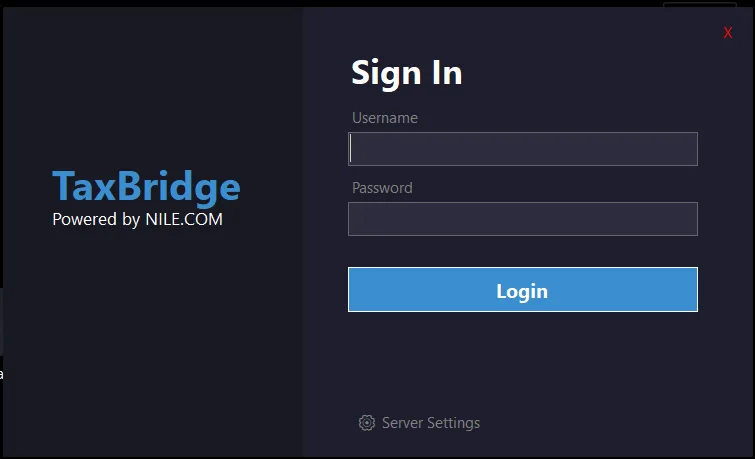
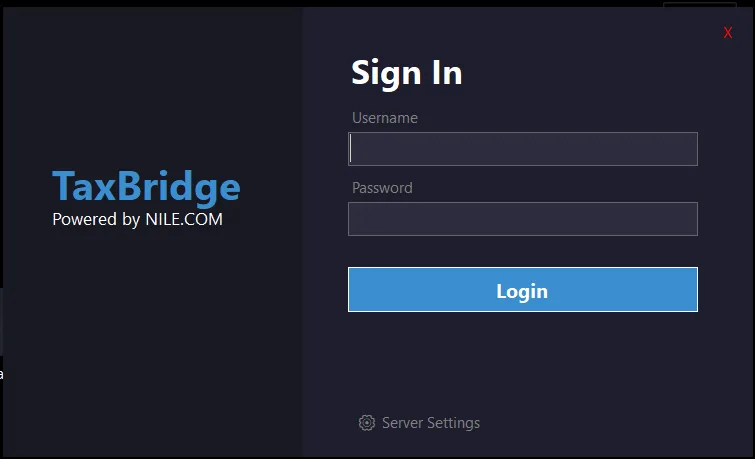
Secure sign-in and role-based access

Every session starts behind an encrypted connection to your own configuration database — no shared cloud account, no generic login.

  • Central authentication against your own configuration database, with Admin and User roles enforced throughout the application.
  • Server connection settings are configurable per install — point at your own SQL Server instance, nothing hardcoded.
  • The application will not proceed past this screen without a validated, RSA-signed licence key.

Business value

One credential, one company database, full control over who can submit receipts under your tax registration.

01Reporting and audit

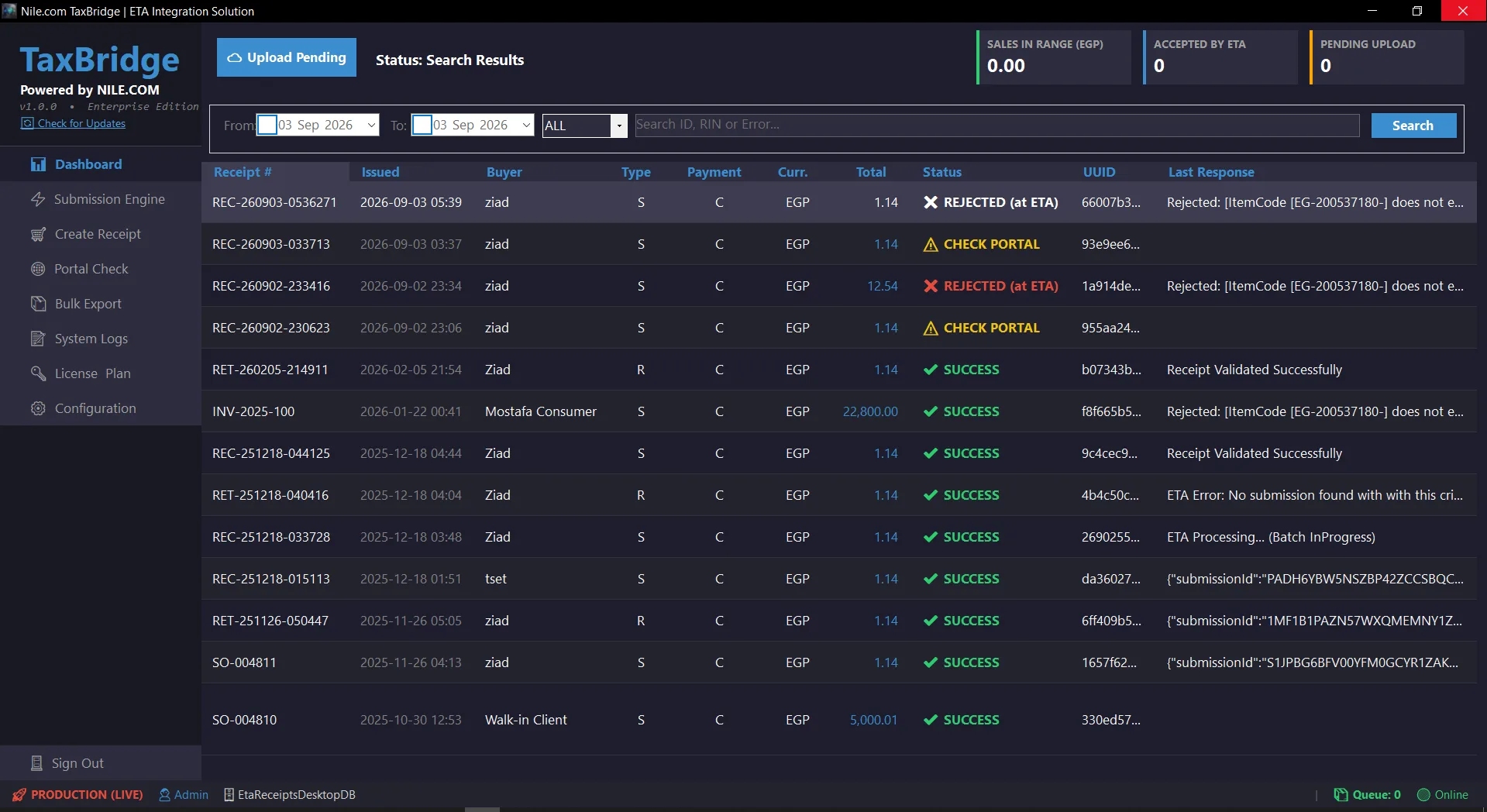
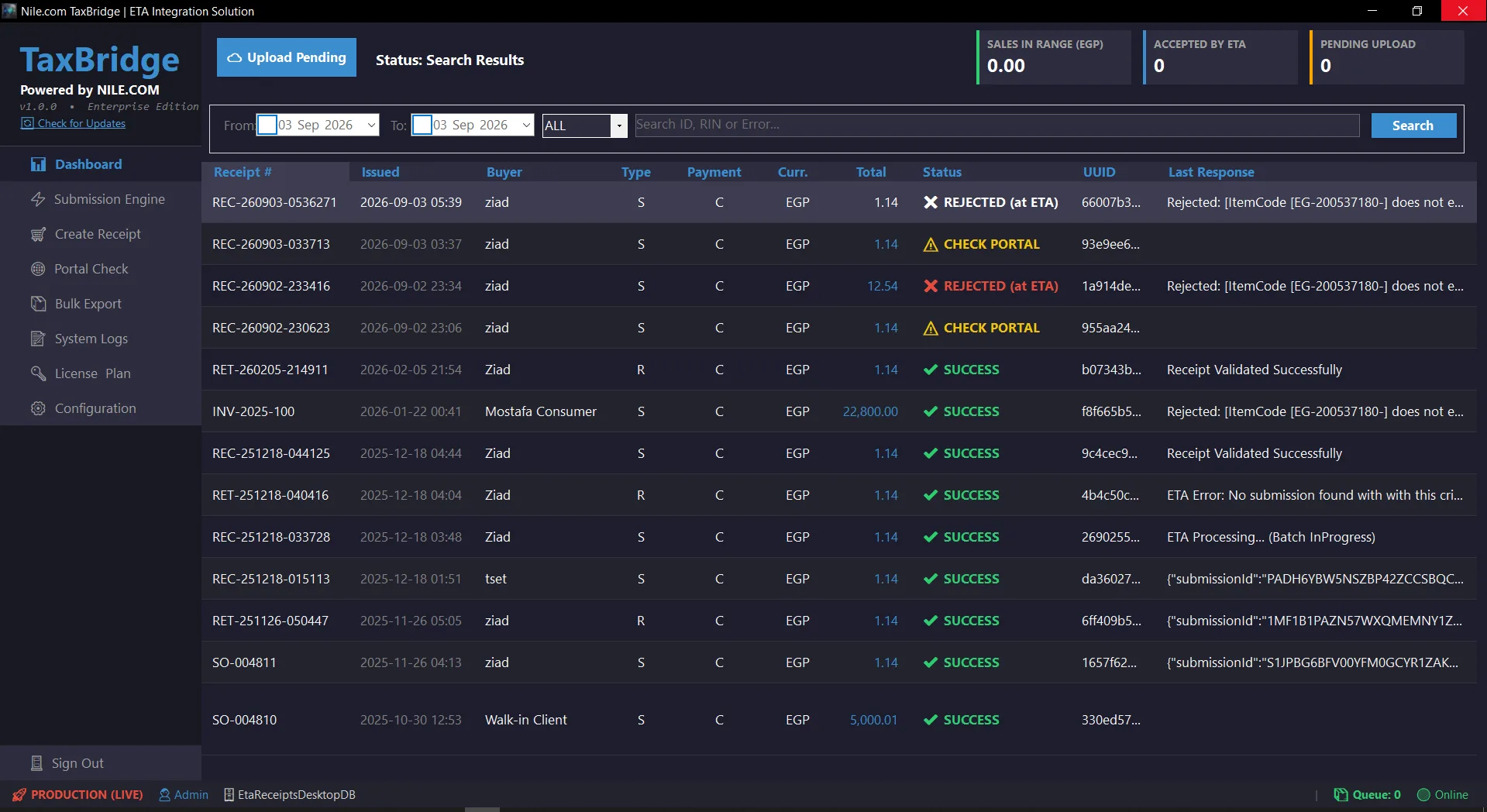
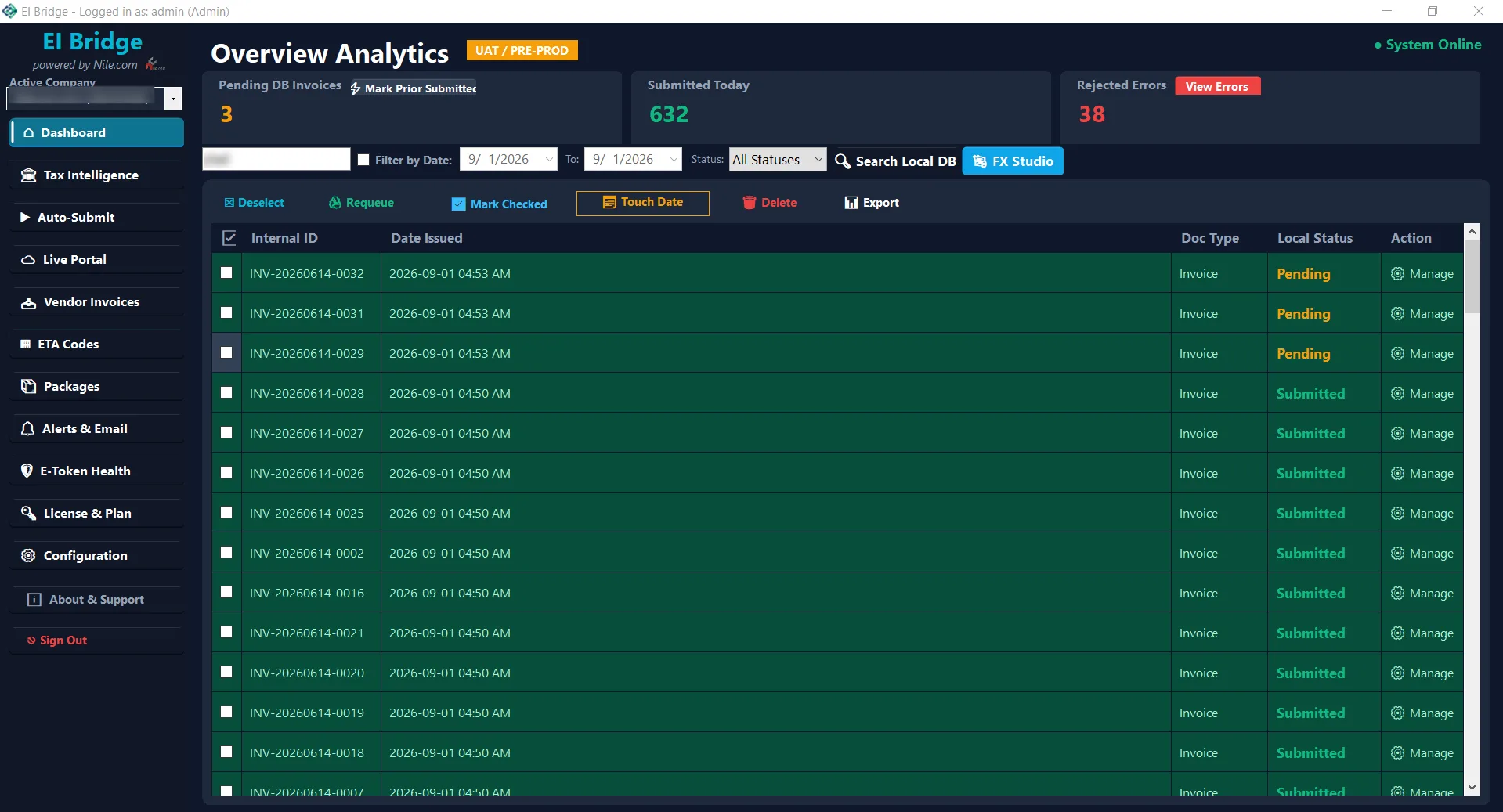
Live receipt command centre

A real-time view of everything issued, everything the tax authority accepted, and everything still waiting — searchable, sortable, and never cramped.

  • Live KPI cards: sales in the selected range, receipts accepted by the tax authority, and how many are still pending upload.
  • Every column sized to its own content and independently resizable — no truncated headers, no wasted space.
  • Double-click any cell — a Receipt #, a UUID, a rejection reason — to copy it instantly, with a visual confirmation.
  • Search by ID, tax registration number or error text, with a full date-range filter.

Business value

One screen answers whether today’s receipts actually reached the tax authority, without opening a single log file.

02Operations and automationFlagship module

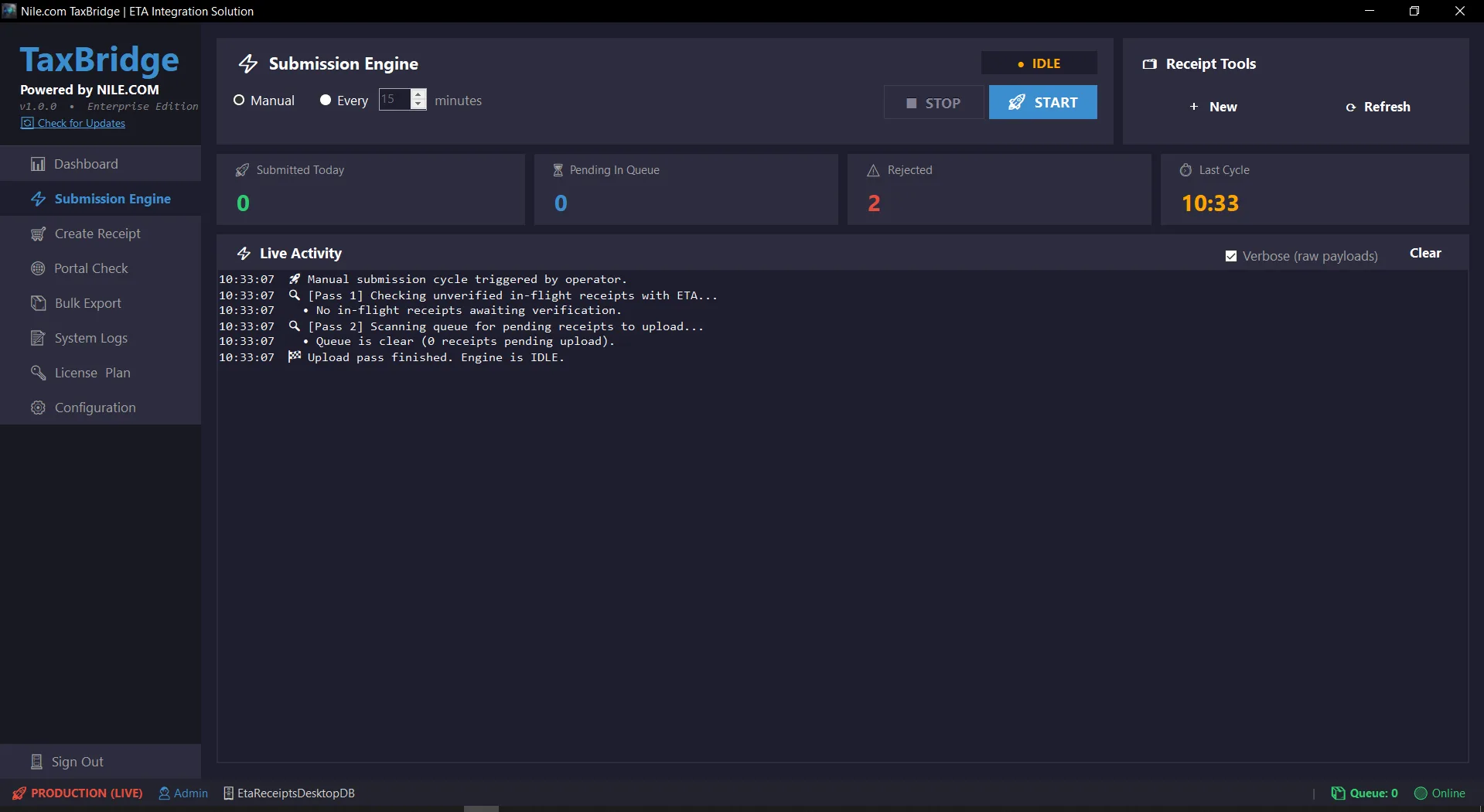
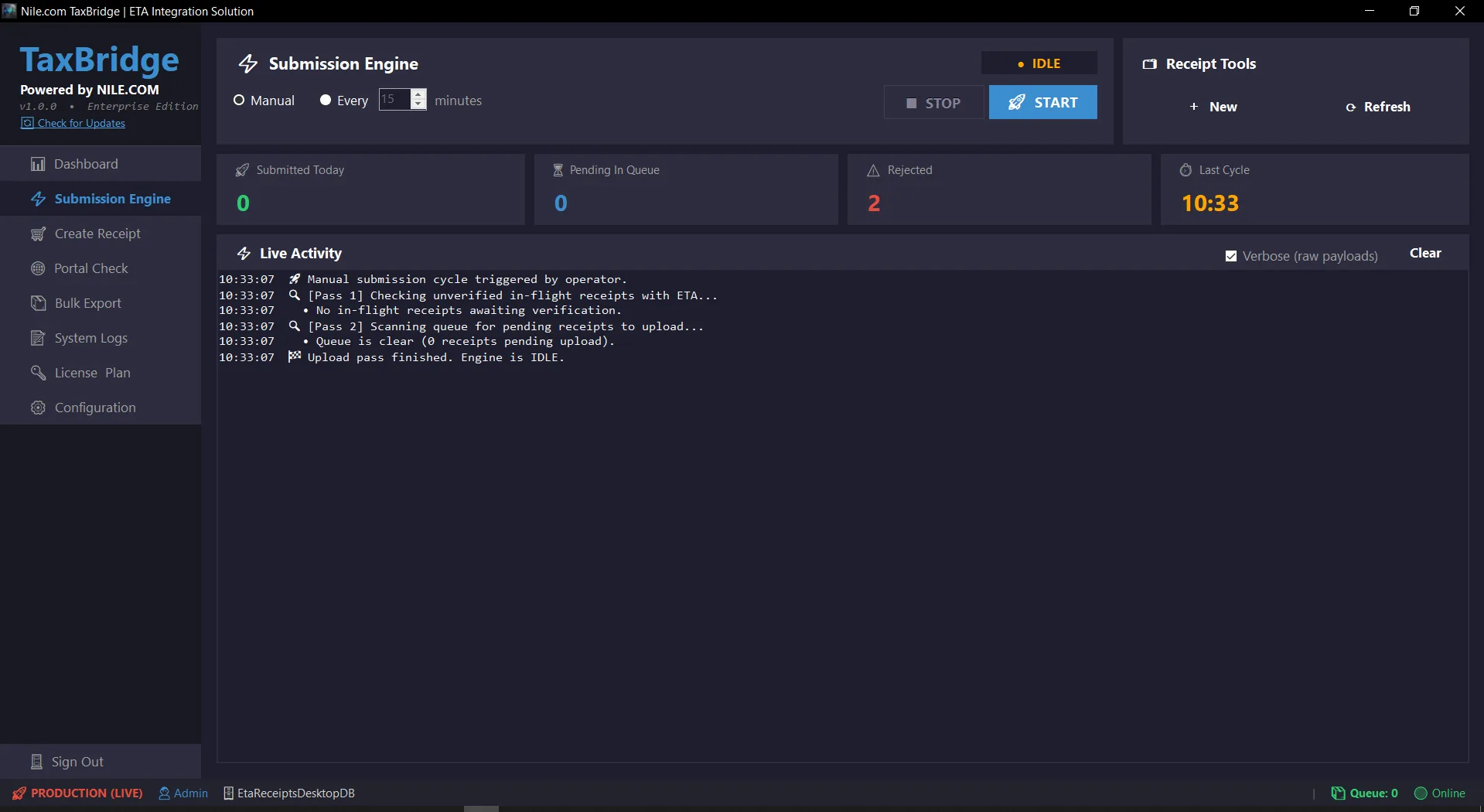
24/7 two-pass submission engine

Set it once — a manual trigger or a fixed interval — and receipts keep moving to the tax authority without anyone watching the screen.

  • Two-pass cycle: first verifies any receipt already sitting at the tax authority in an unconfirmed state, then uploads everything still pending.
  • Strictly sequential submission to preserve the cryptographic hash chain between consecutive receipts.
  • A single shared wait for tax authority indexing per batch, not a wasted wait repeated per receipt.
  • Live activity stream shows every step as it happens, with an optional verbose mode that prints the raw request and response payloads.

Business value

Receipts stop waiting on someone being at their desk — the queue clears itself, day or night.

03Operations and automation

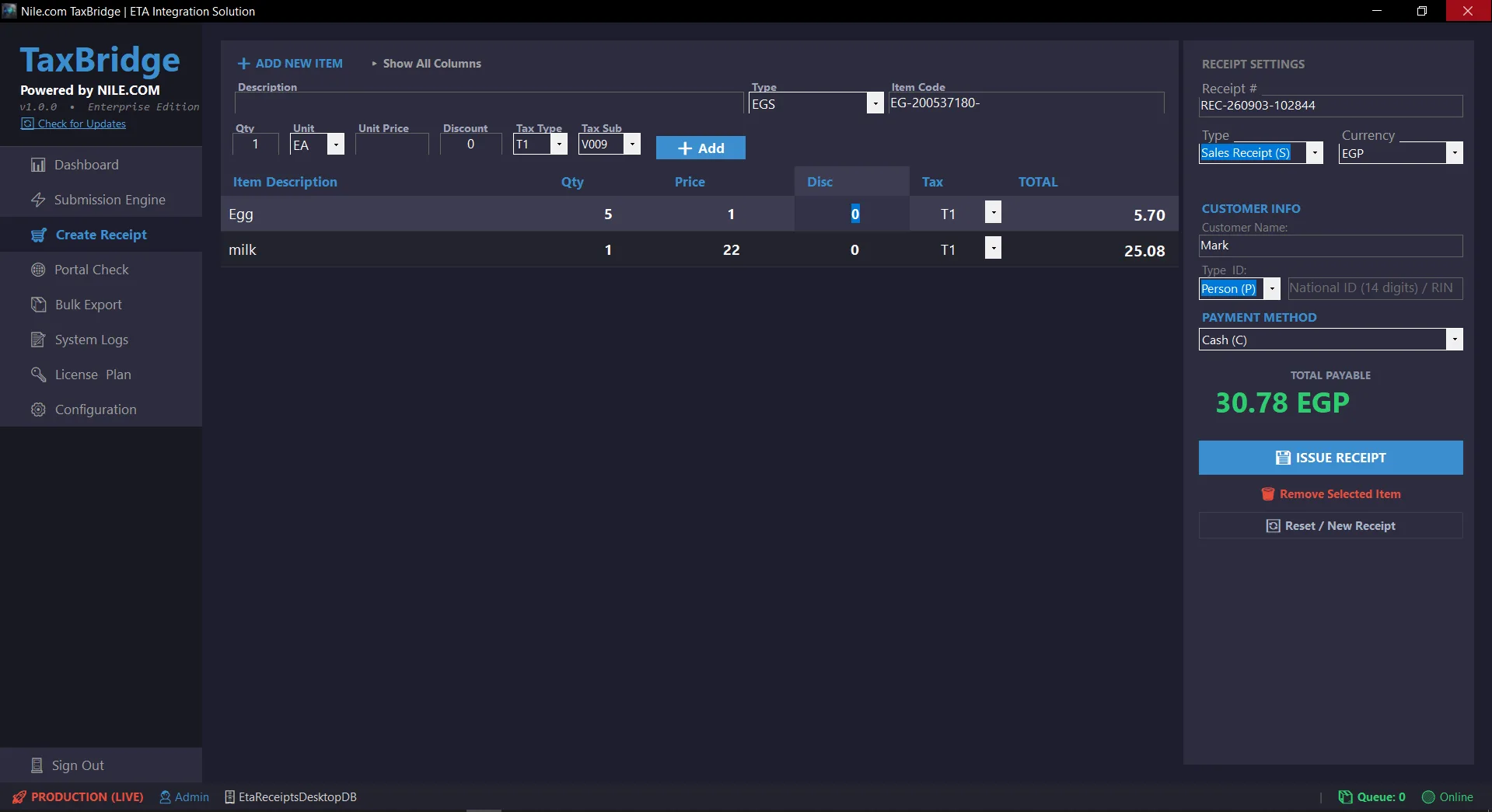
Fast manual receipt entry

For the receipt a customer needs right now — a clean six-column entry grid, with the rest of the detail one click away.

  • Six columns visible while typing — Description, Qty, Price, Discount, Tax, Total — with Item Code, Type, Unit and the remaining tax breakdown behind a single "Show All Columns" toggle.
  • EGS and GS1 item code support, with the EG-[RIN]- prefix filled in automatically for EGS codes.
  • Multiple currencies and payment methods, with the total recalculating live as you type.
  • Sales, Return and Return-Without-Reference receipt types.

Business value

A walk-in receipt issued in seconds, not a form fought with.

04Reporting and audit

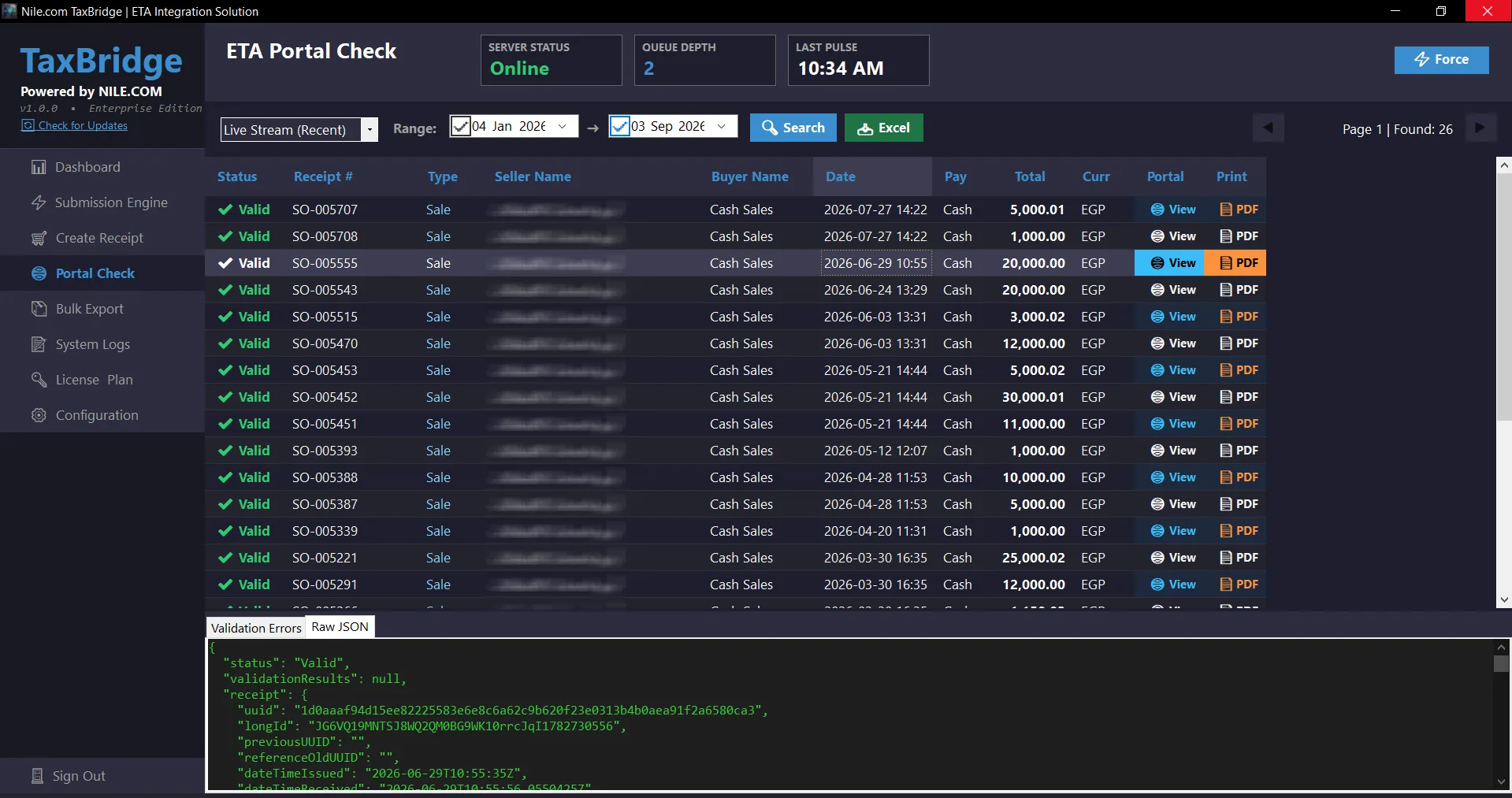
Live ETA portal explorer

Search, verify and inspect any receipt directly against the tax authority’s own records — raw JSON included — without leaving the app.

  • Search live-stream or historical receipts by date range, ID, tax registration number or error text, with fast paging.
  • One-click "View" opens the receipt on the tax authority’s own portal; one-click "PDF" downloads the signed document.
  • Raw JSON and validation-error inspection for every receipt, for when a rejection needs a real answer, not a guess.

Business value

A rejected receipt’s exact reason is one click away — not a support ticket to the tax authority.

05Reporting and audit

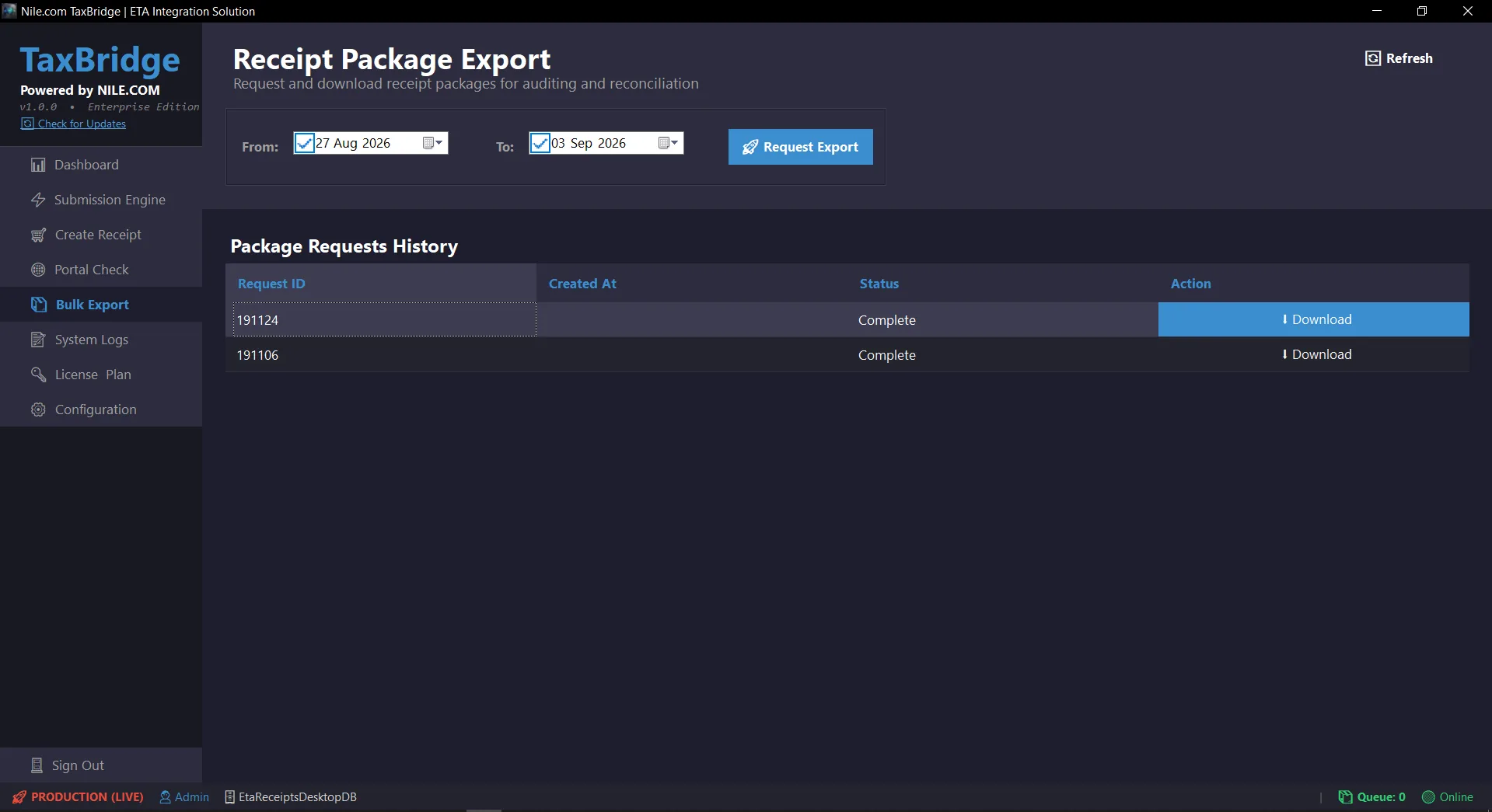
Receipt package export for audit and reconciliation

When an auditor or an accountant needs a whole period’s receipts, request one package instead of exporting rows one at a time.

  • Request a package for any date range directly from the tax authority’s own servers.
  • Full request history with status, and a one-click download once a package is ready.

Business value

A period-end reconciliation becomes one export, not an afternoon of manual copying.

06Security and configuration

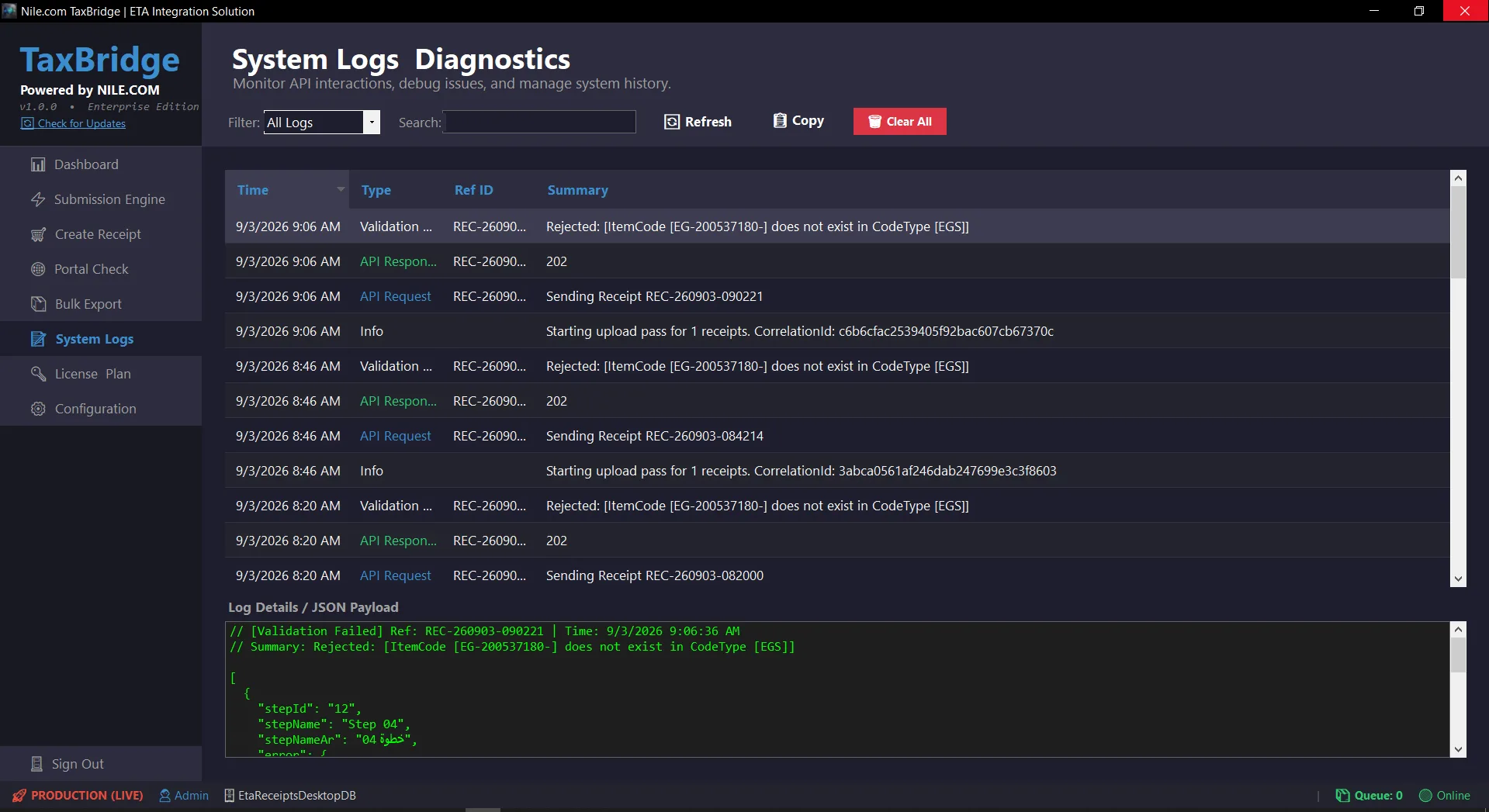
Full API and system audit trail

Every request sent, every response received, every validation failure — kept, searchable and readable, not scattered across log files.

  • Every API request, response and validation event logged with a timestamp, category, reference ID and full JSON payload.
  • Filter by log type, plus free-text search across the whole history.
  • Clearing the log is Admin-only and requires typing a confirmation phrase — the audit trail cannot be wiped by a misclick.

Business value

When something goes wrong, the answer is a search away — not a guess.

07Security and configurationFlagship module

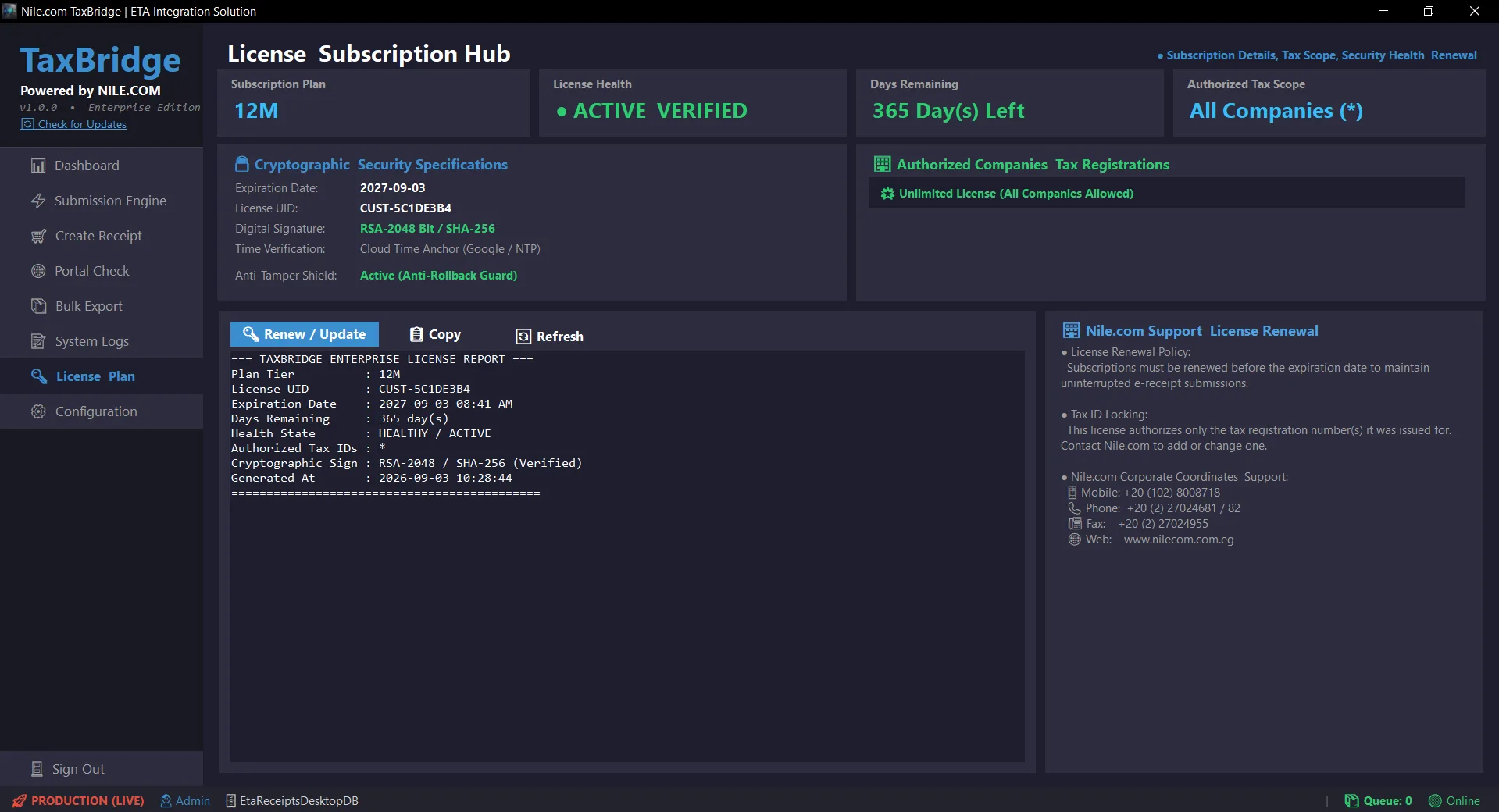
Cryptographically verified, Tax-ID-locked licensing

Full transparency over what the licence actually authorises — verified by signature, not by a value the software just trusts.

  • RSA-2048 signed licence, verified against a cloud time anchor so the local clock cannot be rolled back to extend it.
  • A licence can be locked to the specific tax registration number(s) it was issued for — the submission engine checks this before every upload cycle, not just at login.
  • Full diagnostic report, one click to copy, one click to renew.

Business value

A licence genuinely cannot run against a company it wasn’t sold for — not a trust-based checkbox.

08Security and configuration

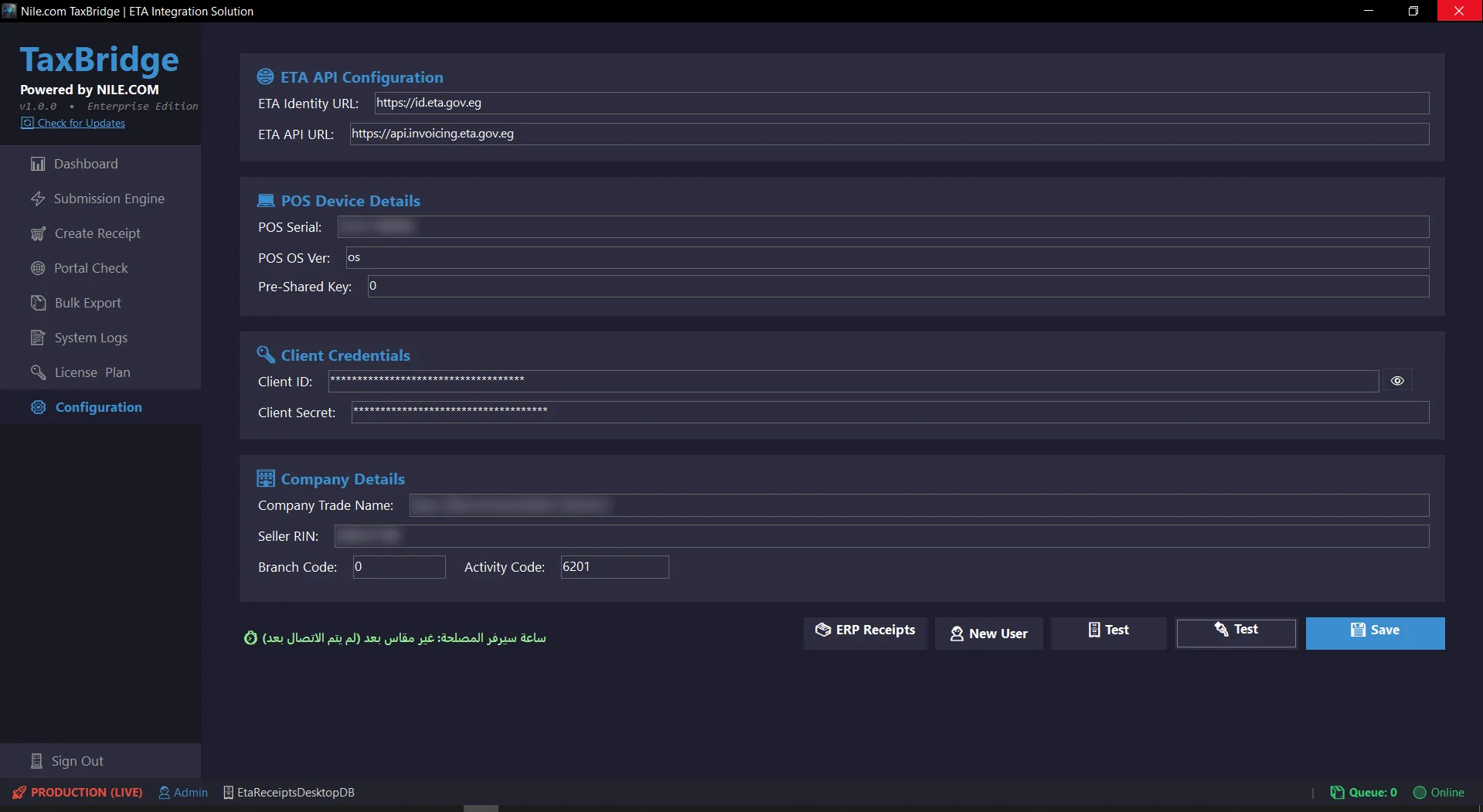
Central ETA, database and company configuration

Every credential and connection setting in one place, with the sensitive ones actually hidden by default.

  • Tax authority identity and API endpoints, POS device details, and company tax details in one screen.
  • Client ID and Client Secret both masked by default, with an explicit reveal control — not shown in plain text on a screen that gets screenshotted.
  • One-click connectivity tests for both the database and the tax authority API before you rely on either.

Business value

Onboarding a new install is filling one screen, not hunting through config files.

Build your business case

How much time does TaxBridge give you back?

Move the sliders to match your operation. The figures update instantly.

From 100 to 80,000
From 1 to 15

Illustrative model: assumes 1.5 minutes of manual handling per receipt plus 15 hours of monthly reconciliation and portal-checking per staff member — of which the two-pass engine automates roughly 70%. Not a measurement of any specific deployment.

Annual hours saved
1,008
Months of labour equivalent
6.3
Full working days returned to the team
126

Technical comparison

TaxBridge v1.0.0 vs. traditional middleware

Ten engineering criteria that decide whether an e-receipt integration project succeeds or stalls.

  • Engineering criterion: Impact on source system code

    TaxBridge Enterprise v1.0.0
    Reads two views or two staging tables — any system integrates with zero code change (Zero-Touch).
    Traditional middleware
    Requires source-system code modification and development fees.
  • Engineering criterion: Licence enforcement

    TaxBridge Enterprise v1.0.0
    RSA-2048 signature verified against a cloud time anchor, and can be locked to specific tax registration numbers.
    Traditional middleware
    A licence flag stored and trusted at face value.
  • Engineering criterion: Submission automation

    TaxBridge Enterprise v1.0.0
    Two-pass engine — verify in-flight receipts, then upload pending ones — on a schedule or on demand.
    Traditional middleware
    Manual trigger only, or a simple retry loop with no lifecycle awareness.
  • Engineering criterion: Audit trail

    TaxBridge Enterprise v1.0.0
    Full request/response history; clearing it is Admin-only and requires a typed confirmation.
    Traditional middleware
    A log table anyone can clear.
See all 10 criteria
  • Engineering criterion: Receipt entry grid

    TaxBridge Enterprise v1.0.0
    Six columns while entering; the rest sit behind a single details toggle.
    Traditional middleware
    A dozen-plus columns visible at once, headers wrapping onto two lines.
  • Engineering criterion: Diagnosing a rejection

    TaxBridge Enterprise v1.0.0
    One-click raw JSON and validation-error inspection for the exact receipt, inside the app.
    Traditional middleware
    A status code with no context, or a manual trip to the tax portal.
  • Engineering criterion: Grid readability

    TaxBridge Enterprise v1.0.0
    Every column sized to its own content, independently resizable, no surprise scroll.
    Traditional middleware
    Fixed or auto-shrunk columns that clip text and force horizontal scrolling.
  • Engineering criterion: Copying a value from the grid

    TaxBridge Enterprise v1.0.0
    Double-click any cell — the full underlying value is copied instantly, with visual confirmation.
    Traditional middleware
    Select, right-click, hope the truncated cell held the full value.
  • Engineering criterion: Software updates

    TaxBridge Enterprise v1.0.0
    Built-in cloud auto-updater with a changelog, installed with a single click.
    Traditional middleware
    Manual reinstall, or a support call.
  • Engineering criterion: Deployment package

    TaxBridge Enterprise v1.0.0
    One self-contained executable plus one SQL Server 2012–2025 installer script.
    Traditional middleware
    Multiple installers and runtime dependencies to sequence correctly.
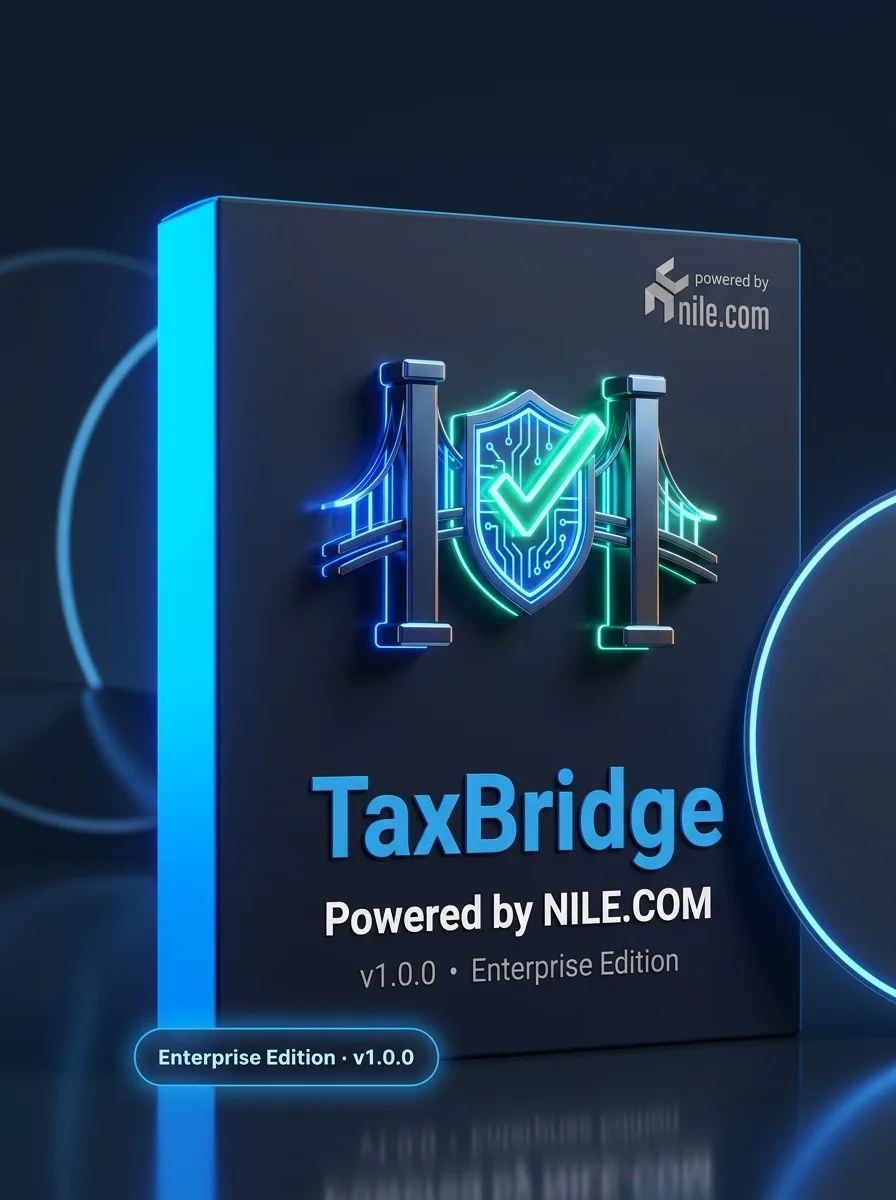
TaxBridge product box

The licensed package

What you actually receive

TaxBridge Enterprise ships as one licensed package. No modules sold separately, no per-user surprises.

  • One standalone executable

    A self-contained Windows application. No separate .NET runtime install, no IIS roles, no dependency chain to maintain.

  • One database installer, SQL Server 2012–2025

    A single script installs the configuration database with a seeded admin account, whatever version of SQL Server you’re running.

  • Tax-ID-locked licensing

    License a single company, or lock one RSA-2048 signed licence to several tax registration numbers for a group — verified cryptographically, not self-reported.

  • Cloud auto-updates included

    The built-in updater keeps you current with new releases at no additional cost — review the changelog, click once, done.

  • Direct NILE.COM support

    A named Egyptian company behind the product, with phone, fax and web support channels.

FAQ

Frequently asked questions

Does TaxBridge work with our POS or ERP?

Yes, if it stores sales on Microsoft SQL Server. Your DBA exposes receipt headers and line items as two views or two staging tables, and TaxBridge reads only from that layer.

Will it write into our tables?

No. Submission status is kept in TaxBridge’s own tracker table, so read-only access to the two views is enough and your triggers are never disturbed.

Which SQL Server versions are supported?

SQL Server 2012 through 2025. One script installs the configuration database with a seeded admin account.

Can the configuration and our receipts live in different databases?

Yes. TaxBridge can read its configuration from one database and your receipts from a completely separate one, so you never have to merge them.

Do we need to install .NET?

No. TaxBridge is a self-contained Windows application with no separate .NET runtime install and no IIS roles.

How is the licence enforced for a group of companies?

One RSA-2048 signed licence can be locked to several tax registration numbers. It is verified against a cloud time anchor and checked before every upload cycle.

More software

Other products from NILE.COM

  • FeaturedInstaller on request

    E-invoicing

    EI Bridge

    Egyptian e-invoicing, fully automated — for any ERP.

    Desktop app
  • Business communications

    Truecaller for Business

    Be recognised and trusted before the call is answered.

    Demo on request
  • CRM

    Nile CRM

    Every customer, deal and campaign in one place.

    Demo on request

See TaxBridge running on your own data

Book a live session with the NILE.COM engineering team. We will connect to a sample of your own SQL Server data and walk a real receipt end-to-end.